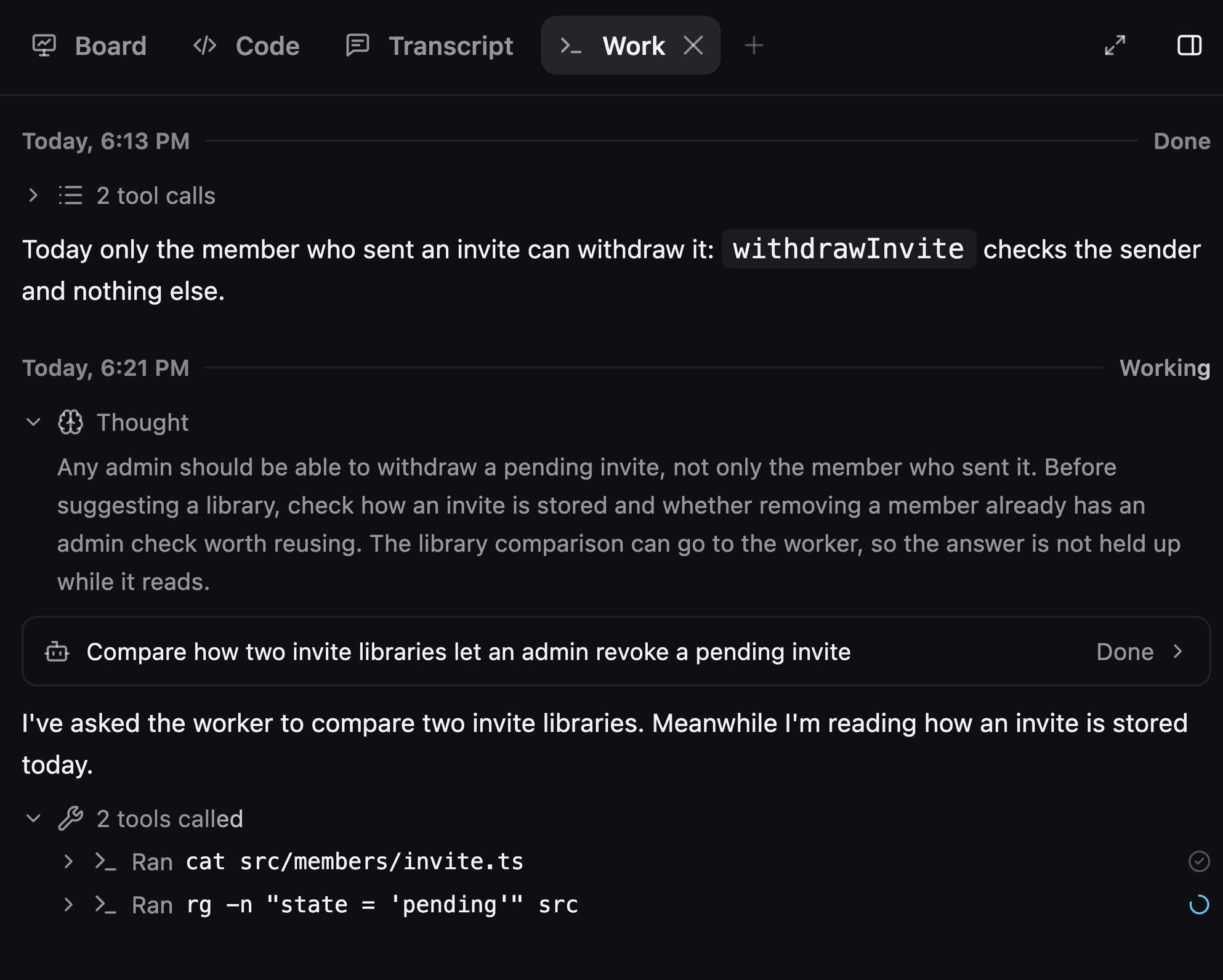
A Work tab for what Luke thought and ran
A new Work tab in the side panel shows each planning turn like an agent transcript: what Luke's planning model thought, the tools it called, and what it wrote. A background worker's whole session opens from its call in the tab. (#1893, #1894, #1895, #1901, #1904, #1905)
Improvements
- The plan column and the side panel use Cursor-style tabs that go icon-only when narrow (#1902, #1910)
- The window uses one spacing scale throughout (#1913)
- Transcript call headers stick flush to the top of the scroll area (#1909)
- A tab's close button draws full size, dim at rest and brighter on hover (#1912)
Fixes
- Fixed Luke falling silent or losing the lead on a planning call (#1908)
- Fixed the right-panel toggle moving and missing rapid clicks (#1892)
- Fixed title-bar buttons showing through sliding panes (#1914)
- Fixed New plan in the folded sidebar not leaving the new-plan page (#1915)
- Fixed the sidebar's plan row missing its rename pencil (#1915)
Misc
- Removed the Quit Luke buttons from sign-in and Settings, since ⌘Q in the app menu quits Luke (#1916)